Why Are My LED Shop Lights Flickering?
If you're wondering why your LED shop lights flicker, common causes include loose connections, incompatible dimmers, failing drivers, or power supply problems. Unplug lights before inspecting accessible connectors, and call an electrician for damaged wiring, burning smells, sparks, or repeated breaker trips.
On this page (7 sections)
- Why do my LED shop lights flicker?
- How can you narrow down the source safely?
- When should you stop using a flickering shop light?
- Can replacing the light fix the flicker?
- What should you check before buying another shop light?
- How can setup and care reduce repeat problems?
- What should you do about flickering LED shop lights?
LED shop lights flicker because of loose connections, incompatible dimmers, failing drivers, or power supply problems. If you're asking “why do my LED shop lights flicker,” start by noting which fixtures are affected and when it happens.
One flickering fixture points toward a local connection or fixture fault. Several lights pulsing together suggest a shared connector, control, or supply issue, so buying replacements may leave the cause untouched.
Why do my LED shop lights flicker?
An interruption or change in power reaching the LEDs can cause flicker. The source may be outside the fixture, such as a loose connection, or inside it, such as a failing driver.
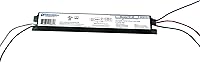
An LED driver converts incoming power into the form the LEDs need. A driver fault can cause repeated flashing, pulsing, or intermittent operation even when the light still turns on.
Why do LED shop lights flicker at a loose connection?
A loose plug or link connector can interrupt power, affecting one light or everything farther along a linked run. Switch off and unplug the entire run before looking at accessible connectors.
Check for plugs that aren't fully seated, strained cables, and visible damage. Reconnect only intact, compatible connectors according to the instructions, and never tape or splice a damaged cord.
If several linked lights flicker, their shared feed deserves attention. Our guide to wiring and linking LED shop lights safely explains connection types and link limits.
Can a switch or dimmer cause flicker?
An incompatible dimmer can cause pulsing, especially at low settings. Use dimming only when both the fixture instructions and control instructions confirm compatibility.
A pull chain or cord-mounted on/off switch doesn't mean a light supports dimming. None of the replacement options below should be chosen for a dimmer circuit without confirmation from the manufacturer.
A wall switch that buzzes, feels unusually warm, or shows discoloration needs professional attention. Don't remove its cover or adjust wiring yourself.
How can you narrow down the source safely?
Record the pattern before changing anything, then inspect only accessible plug-in connections with the lights unplugged. These details help separate a fixture problem from a shared supply problem.
- One fixture flickers: note its position and whether neighboring lights remain steady.
- A whole linked run flickers: count the fixtures and check the approved link limit.
- Several separate lights flicker together: note any shared switch and what equipment starts at that moment.
- Flicker begins after a change: record the new dimmer, cable, fixture, or added link.
- Flicker appears after warming up: note how long the light runs before it starts.
If a compressor or another motor starts at the same moment, tell the electrician. That timing is a useful clue about a possible voltage change, rather than proof that the light needs replacement.
Leave outlet, switch, and hardwired connection checks to a qualified electrician. Read about plug-in versus hardwired LED shop lights if you're unsure which parts of your setup are accessible plug-in connections.
What if the lights flicker only when cold?
Check the fixture's operating temperature range before choosing lights for an unheated garage. Record the room temperature when flicker occurs, but don't leave a faulty light running to see whether it settles.
Cold conditions can affect operation, but they don't rule out connection or driver faults. Our guide to LED shop lights in a cold garage explains what to check before buying.
What if flicker appears only on a phone camera?
Camera banding can occur even when a light looks steady to your eyes because the camera's shutter interacts with changes in light output. A phone video alone can't guarantee the cause or measure flicker reliably.
If you record projects in your workshop, ask the manufacturer for flicker information for the exact model. Brightness and color temperature don't guarantee suitability for video.
When should you stop using a flickering shop light?
Stop using affected lights when flicker comes with burning smells, sparks, unusual heat, crackling, discoloration, damaged wiring, or repeated breaker trips. Arrange an inspection by a qualified electrician.
Disconnect power only if you can do so safely. Leave a hot, sparking, or damaged plug alone, and don't keep resetting a breaker.
A wall switch being off doesn't make internal wiring safe to touch. Don't open a fixture, driver housing, or electrical box to investigate.
Can replacing the light fix the flicker?
Replacement helps when the fault is in the fixture, after external connection and supply issues have been addressed. None of these products has a flicker-free performance claim in the information available here, so choose by installation needs rather than assuming a guaranteed cure.
Sunco: for several short plug-in runs
Choose the Sunco 10-pack for a garage with several lighting zones where you can arrange separate plug-in runs. Its frosted covers suit buyers who want diffused light rather than exposed LED points.
The fixtures include mounting hardware and hanging chains, giving you direct-mount and suspended options. Plan the power feeds before ordering, since a large pack doesn't mean every fixture belongs on one chain.
Skip this pack if you need only one replacement or want all 10 lights connected in a single run. It also isn't a substitute for checking a suspect outlet or wall control.
Barrina T8: for flexible workshop layouts
Choose the Barrina T8 10-pack when you need installation choices and connecting cables for several rows or work areas. Each fixture delivers 5500 lumens at 5000K, with a wide 270-degree beam.
The pack includes 5 switched power cords, hardwiring leads, and 48-inch connecting cables. It supports up to 6 fixtures in a series, while any hardwired installation should go to an electrician.
Skip it if a small replacement job would leave most of the pack unused. When combining older and newer Barrina products, use the required new male-female connector cables and confirm compatibility before connecting them.
Barrina BS42a: for a smaller garage refresh
Choose the Barrina BS42a 4-pack for a smaller replacement project where diffused light and tidy cable routing matter. Its frosted cover softens direct light, and concealed wiring runs behind the housing.
Each fixture provides 4800 lumens at 5000K. Pull-chain controls and included hanging or direct-mount hardware let you plan access around benches and storage.
Skip it if you need a confirmed dimmable fixture or an outdoor light. Its indoor design also makes checking the operating temperature range essential for an unheated space.
What should you check before buying another shop light?
Match the replacement to your power connection, controls, environment, and layout. More light output won't solve an incompatible dimmer or a poor electrical connection.
Check these details before ordering:
- Connection type: choose plug-in or hardwired to match the planned installation.
- Cable compatibility: use approved connectors for the exact model, even if another cable appears to fit.
- Link limit: count every fixture in the run, including existing lights.
- Mounting and reach: measure cord routes and make sure switches remain accessible.
- Room conditions: confirm suitability for temperature, moisture, and dust exposure.
For an old fluorescent installation, read whether LED shop lights need a ballast. A complete LED fixture and an LED replacement tube can require different installation work.
Spread light across the work area rather than choosing output alone. Our guide to LED shop light spacing helps you avoid bright rows separated by dark work zones.
How can setup and care reduce repeat problems?
Secure mounting, supported cables, and clear housings help prevent avoidable connection and heat problems. Follow the fixture instructions for mounting position and clearance.
Support each fixture with its specified hardware. Never let a power cord or linking cable carry its weight, and keep connectors away from garage-door tracks, sharp edges, and moving tools.
Leave enough cable slack to avoid pulling on connectors without creating loose loops where they can snag. Our guide to hanging LED shop lights covers mounting choices.
Switch off, unplug, and let fixtures cool before cleaning them as directed. Remove surface dust with the recommended method, avoid spraying cleaner into connections, and keep housings clear of stored items.
Common mistakes include mixing similar-looking connectors, exceeding link limits, and covering a fixture to reduce glare. Choose a suitable diffuser or adjust placement instead of wrapping or covering the light.
What should you do about flickering LED shop lights?
Use the pattern to decide between a connection check, professional inspection, and replacement. If you're still asking why your LED shop lights flicker after checking intact, unplugged connections, stop guessing and have the cause assessed.
Choose Sunco for multiple short plug-in runs, Barrina T8 for flexible rows with installation choices, or Barrina BS42a for a smaller refresh with diffused light. Buy only after the connection type, controls, and room conditions match.
If several lights flicker together or warning signs appear, address the shared electrical problem first. For planning the replacement layout, use the garage and workshop lighting guide.
Frequently asked questions
Why do LED shop lights flicker when they are turned on?
Startup flicker can come from a driver, an incompatible control, or an unstable connection; note whether it happens once or continues as repeated pulsing, and whether one fixture or several are affected. Persistent or new flicker needs attention, especially if it comes with buzzing, unusual heat, or discoloration.
Can a dimmer make LED shop lights flicker?
Yes, an incompatible dimmer can make LED shop lights flicker, pulse, or switch off at low settings; both the fixture and the control must support the same dimming setup. An on/off switch or pull chain doesn't guarantee compatibility, so check the instructions before connecting shop lights to a dimmer.
Is a flickering LED shop light dangerous?
Flicker can signal a connection or electrical fault, especially when it comes with burning smells, sparks, unusual heat, discoloration, or repeated breaker trips. Stop using the affected lights and disconnect power only if you can do so safely; leave damaged plugs, internal wiring, and electrical boxes to a qualified electrician.
Why do linked LED shop lights flicker?
Linked lights can flicker because of a loose connector, damaged cable, faulty fixture, or incompatible connection; a run beyond the manufacturer's link limit also needs correction. Unplug the entire run before inspecting accessible connectors, count the connected fixtures, and use only cables approved for that exact model.